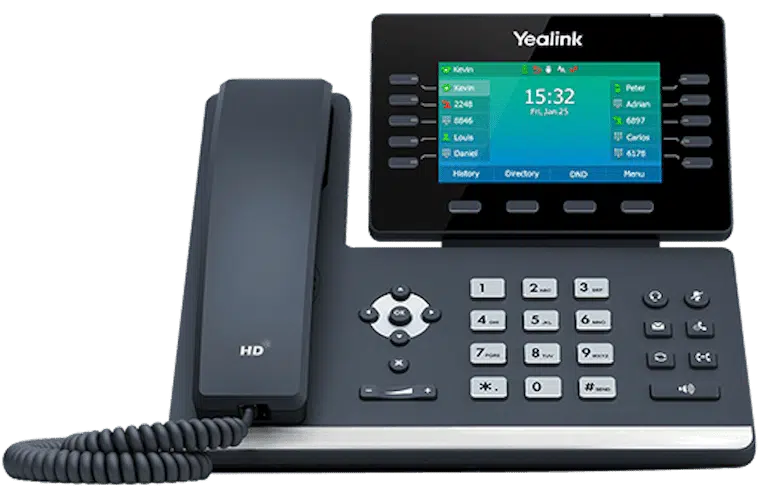
The Phone Was Already on Your Desk. Why Couldn’t Anyone Use It? The Case for a Fully Programmed Business Phone
There’s a quiet failure that happens in offices all over the country. A business switches to a new VoIP provider, a box arrives, someone plugs in a row of identical-looking desk phones — and then nobody can quite use them. Putting a call on hold for a coworker becomes a guessing game. Paging the back room means walking to the back room. Calling the person two desks over means looking up their extension on a sticky note. The phones technically work. They just don’t help.
That gap — between a phone that powers on and a phone that’s genuinely set up for your office — is one of the biggest hidden differences between phone providers. And it comes down to one question: did someone program your business desk phones, or did they just ship them?
Software-first providers treat the desk phone as an afterthought
Most modern VoIP companies are software companies. Their product is an app and a dashboard, and the physical desk phone is a low-margin accessory they’d rather you didn’t think about. So they ship a cheap two- or three-button handset, never program it for your specific office, and leave you to self-install, self-assign extensions, and figure out the features from a PDF.
The result is a phone that’s “VoIP” in name but behaves like a brick. The buttons that could make office life easier — the ones that monitor lines, grab held calls, page the building, or dial a coworker by name — sit unprogrammed and unused. You paid for capability you’ll never touch because nobody set it up.
Phonewire does the opposite. Every phone is programmed to be intuitive from day one, by the technician who installs it on-site. Here’s what “fully programmed” actually buys you.
Shared-hold buttons — with a light so everyone can see the call
This is the feature people miss most and notice immediately when they finally have it.
On a properly programmed Phonewire phone, putting a call on hold for a coworker is one button — and a light turns on so everyone can see that a call is waiting. Your coworker glances at their phone, sees the lit button, presses it once, and they’re talking to the caller. No “let me transfer you,” no reciting an extension, no cryptic feature codes, no call vanishing into a void with no indicator that anyone is on the line.
Compare that to the typical un-programmed setup, where a held call disappears, nobody’s sure who has it, and the customer sits on hold indefinitely until someone happens to check. The shared-hold-with-a-light is a small thing that changes how a whole office answers the phone.
Paging through the phones you already have
Need to make a building-wide announcement — “delivery at the front,” “Dr. Chen, line two,” “we’re closing in five”? On a Phonewire system you page through the speakers built into the desk phones themselves. No separate overhead paging system to buy, no special speakers, no adapters wired into the ceiling.
Most providers either can’t do this or require extra hardware. Phonewire programs paging into the phones during install, so the intercom capability is there on day one using equipment that’s already on every desk.
Call anyone in the office by name
Your team shouldn’t need a cheat sheet of extension numbers. Phonewire programs an on-phone name directory, so anyone can scroll to a coworker’s name and call them directly — no memorizing four-digit extensions, no taped-up lists that go stale every time someone changes desks.
One shared vendor speed-dial list, on every phone
Here’s the operational detail that saves real time. Phonewire sets up a shared external speed-dial directory — your common vendors, suppliers, and partners — and pushes it to every phone in the office. Anyone can call the parts supplier, the landlord, or the shipping company by name from any desk, without hunting for the number. One list, shared everywhere, maintained centrally.
Everything assigned and configured for you
Extensions assigned. Buttons mapped. Ring groups built. Features turned on and labeled. You don’t crawl under a desk to plug things in, and you don’t spend your first week guessing which button does what. The technician who knows the system configures it for your office, in your office, and trains your team before leaving.
Why this is the real proof a provider is competent
It’s easy for any company to claim great service. The programmed desk phone is where the claim gets tested, because it’s concrete and visible. When a held call shows a light, when paging works through the phones, when you call a coworker by name — those are daily, tangible signs that someone who knew what they were doing set up your system on purpose.
This isn’t about being anti-app. Mobile and desktop apps are the right tool for people who move around, and Phonewire offers them too. But for the desks and rooms where calls are constant — reception, the front office, support — a real, fully programmed desk phone is faster, clearer, and harder to fumble than a softphone buried behind notifications.
The way business phones used to work — where the buttons just worked — wasn’t nostalgia. It was good design that the software-first era got lazy about. Phonewire brings it back, and sets it up for you.
Want to see a phone that’s actually set up for the way your office runs? Book a free consultation and we’ll show you exactly how your phones would be programmed — shared hold, paging, directories, and all — before you commit to anything. Explore our business desk phones to see the hardware we install and program.